
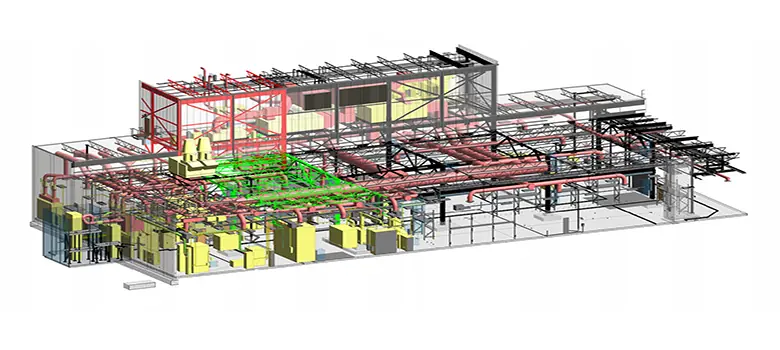
BIM in Facility Management: Does the BIM Model Actually Add Value?
26 March 2020 by Luis Fornez
Facility Management (FM) — the discipline covering building operations and maintenance — ranks as the 2nd to 4th largest operating expense for most organizations. That alone makes it a critical consideration the moment a project reaches handover and begins operations.
Yet the most common view among professionals, surfaced by even a quick search on BIM applications in FM, is that BIM's one great contribution is slashing the time and cost of the initial data-gathering phase: capturing equipment specs, systems data, and infrastructure details into a Computerized Maintenance and Management System (CMMS) at project closeout.
Which naturally raises the question: is the BIM model irrelevant once a building enters operations?
Rethinking BIM for CMMS
That's arguably the first — and most logical — question, particularly for civil engineering professionals who have long maintained As-Built drawings as standard practice.
The more recent term for this concept is "Digital Twin." While it echoes the original idea behind As-Built documentation, the presence of a live database tied to the resulting asset changes everything. But the database is only part of the story.
The ability to navigate a space and locate equipment visually within a BIM model — rather than searching through a floor index or equipment list — is a substantial advantage. Paired with any level of indoor localization [1], searching for an asset by name or description becomes unnecessary.
Maintenance personnel locations could be reflected in real time within a BIM model embedded in an online CMMS platform, immediately surfacing nearby equipment and systems for the technician on the ground.
This kind of dynamic exchange between a BIM model and a CMMS requires sophisticated visualization integration — but it is neither expensive nor technically out of reach today. Several integration paths already exist.
BIM-to-CMMS Integration Options
Two fundamental approaches exist: Open schema and Proprietary schema.
Open Schema
The Open approach uses a web-accessible BIM viewer — hosted by the BIM authoring platform — embedded directly into the CMMS software via an HTML iFrame. The mechanism is the same as embedding a Google Maps view into a webpage: the BIM model arrives with all the equipment and system objects the CMMS needs to function.
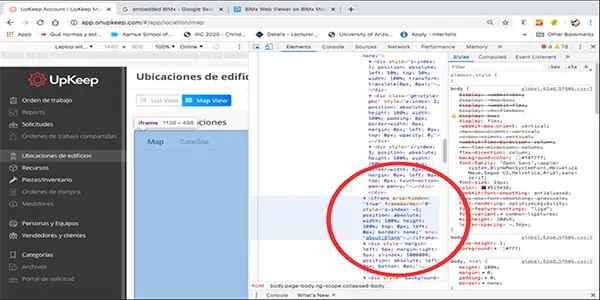 BIM model embedded in a CMMS platform via iFrame.
This integration works with virtually any cloud-based CMMS available on a freemium or monthly enterprise license [2], and requires minimal support from the software vendor to configure the import.
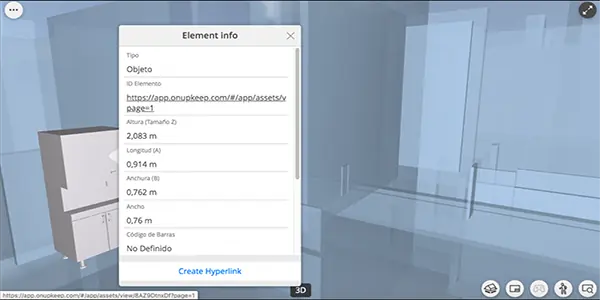 Equipment properties in the BIM model showing the unique URL generated from the UpKeep CMMS platform.
The key is embedding unique web addresses in each equipment object's BIM properties at modeling time. Those unique URLs are generated first within the CMMS — compiled from a master asset list provided by project specialists — then written into the corresponding BIM objects.
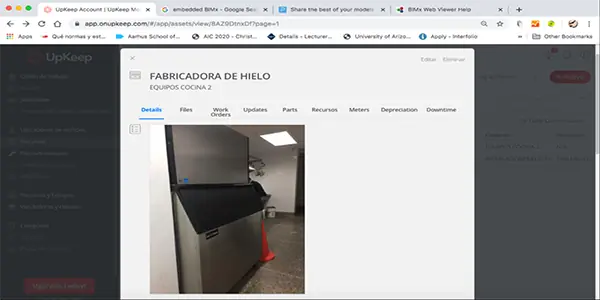 Unique asset URLs within the UpKeep CMMS platform.
This closes the loop: clicking on any piece of equipment in the BIM model opens its corresponding record directly in the CMMS — automatically, with no additional search required.
The approach works with major BIM authoring tools such as ArchiCAD and Revit, provided asset URLs are defined in the CMMS and mapped to the corresponding model objects. Both Graphisoft and Autodesk offer viewers that can be embedded as iFrames via browser or CMMS mobile app.
Proprietary Schema
The Proprietary path relies on established integrations between two vendors: a BIM authoring platform and a CMMS provider. The most prominent example is Autodesk's Revit paired with IBM's MAXIMO [3].
In this setup, Autodesk uses its FORGE [4] visualization platform to configure the BIM viewer within MAXIMO [5].
This integration was put to use recently on the Queens Wharf Brisbane project [6]. Notably, the project incorporated not only Revit models delivered via FORGE, but also ArchiCAD models — both managed through dROFUS database management tools.
Open or Proprietary: Which Path to Take?
As with most decisions in this space, the answer depends on budget and project scale. A third variable deserves equal weight, though: flexibility for innovation.
Open schemas make it straightforward to layer on new capabilities — indoor localization being the obvious example. Proprietary schemas tend to make that kind of extension complex or inflexible.
For projects under 50,000 m² with maintenance requirements typical of large commercial facilities, an Open integration approach is worth serious consideration. It delivers meaningful innovation headroom in areas that matter: mobility, sustainability, and day-to-day operations and maintenance.
Written by: Architect Luis E. Fornez lfornez@innotica.net @ifornez
References
- Location-based services software such as the Quuppa Intelligent Locating System can, with a single line of code and one or more sensors (depending on required accuracy), locate a mobile device — with a margin of error as small as 5 cm — once the user has downloaded the corresponding app.
- Examples include Hippo CMMS and UpKeep. See more at: https://financesonline.com/facility-management/
- https://en.wikipedia.org/wiki/Maximo_(software)
- https://forge.autodesk.com/blog/learn-forge-tutorial-gets-dashboard-section
- Note that for both FM and BIM Use Cases, the COBie and IFC standards appear as the common thread — both are fundamental to interoperability of elements and objects within BIM.
- https://www.youtube.com/watch?v=VW_m_CJhlMY&feature=youtu.be